

Table of Contents
Important Update Before You Read Further
On June 3, 2026, OpenAI announced it is winding down Agent Builder, along with the Evals platform, with both scheduled to leave the OpenAI platform on November 30, 2026. Existing users can continue using Agent Builder during the transition window, and ChatKit remains available. For workflows that need to continue long-term, OpenAI is directing developers toward the code-first Agents SDK, or toward Workspace Agents in ChatGPT for natural-language use cases.
This changes how you should read the rest of this guide. Agent Builder is still fully functional today, still a legitimate way to prototype and even ship agent workflows, and understanding how it works is genuinely useful, both because thousands of teams are actively using it right now, and because its node-based mental model (agents, tools, guardrails, control flow) is the same model the Agents SDK uses under the hood. But if you’re deciding today whether to build a new, long-lived production system on top of it, you need the deprecation timeline in front of you before you start. We cover exactly how to think about that decision in the migration section below.
What Is OpenAI Agent Builder?
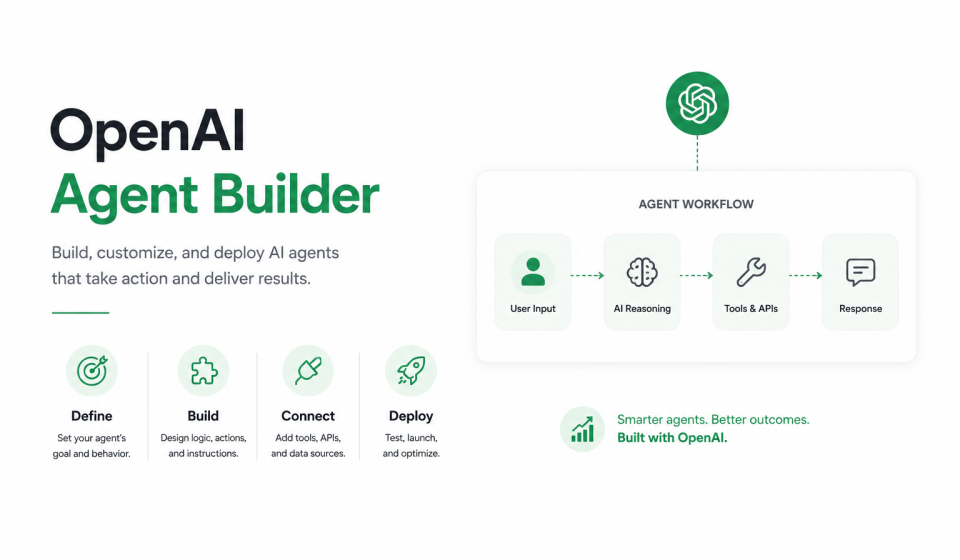
Agent Builder is one part of AgentKit, a comprehensive set of tools OpenAI released for building and deploying AI agents, which also includes ChatKit for embedding chat-based agents and a Connector Registry for managing how tools connect across ChatGPT. Specifically, Agent Builder provides a visual canvas for composing agent logic with drag-and-drop nodes, connecting tools, and configuring custom guardrails, and it supports preview runs, inline eval configuration, and full versioning.
In plain terms: it’s a visual, node-based interface where you design how an AI agent thinks and acts, without writing the orchestration code yourself. You connect nodes on a canvas, where each node is a distinct step, a decision, a tool call, or an action, and the connections between them form the logic of the agent. Each node performs a specific function, from classifying user intent to making API calls or connecting to external services.
AgentKit was beta-launched at OpenAI’s developer conference in San Francisco, positioned as a no-code agent builder meant to let developers and enterprises create agents, including multi-agent systems, and put them into production with just a few clicks. It was announced at DevDay on October 6, 2025, described by Sam Altman as a complete set of building blocks designed to help teams take agents from prototype to production.
Check out one of the best, which one you prefer chatGPT or Claude : Claude Opus 4.8 vs. ChatGPT 5.5: Which One Is Better?
The Problem Agent Builder Was Built to Solve
Before AgentKit, building agents meant juggling fragmented tools: complex orchestration with no versioning, custom connectors, manual eval pipelines, prompt tuning, and weeks of frontend work before launch. Agent Builder collapses that into a single visual workspace, so the logic that used to live scattered across scripts, prompt files, and ad hoc integration code becomes one canvas that product managers, legal reviewers, and engineers can all look at and understand together.
Why Agent Builder Matters (Even With the Deprecation Notice)
Three things make this tool worth understanding in depth, regardless of its lifecycle status.
First, the speed story is real and well-documented. At Ramp, the team went from a blank canvas to a functioning buyer agent in just a few hours, a process that transformed what once took months of complex orchestration, custom code, and manual optimization into a couple of hours, keeping product, legal, and engineering aligned and slashing iteration cycles by roughly 70%, getting an agent live in two sprints instead of two quarters. Similarly, LY Corporation, a major Japanese technology and internet services company, built a work assistant agent with Agent Builder in under two hours.
Second, the underlying mental model is durable, even if the specific product isn’t. The node types, the guardrail pattern, the way workflows separate agents from tools from control-flow logic, all of this maps directly onto how the Agents SDK is structured in code. Learning Agent Builder is, in effect, learning the vocabulary of the Agents SDK before you have to write it by hand.
Third, it’s still the fastest way to prototype. Even teams that plan to ship in code often build the first version of a workflow visually, because it’s faster to see the shape of the logic and course-correct before committing to a codebase.
How Agent Builder Works: The Core Architecture
Workflows: The Central Concept
A workflow is a combination of agents, tools, and control-flow logic, encapsulating all the steps and actions involved in handling a task or powering a chat, with working code you can deploy when ready. The basic process is: design a workflow in Agent Builder, which defines your agents and how they’ll work; publish the workflow, which becomes an object with an ID and versioning; then deploy it.
That “object with an ID and versioning” detail matters more than it might first appear. It means a published workflow isn’t just a saved file, it’s a referenceable, version-controlled artifact you can point production traffic at, roll back, or run side-by-side with a newer version during testing.
The Canvas: Visual, Left-to-Right Logic
The canvas works like a flowchart: information flows from left to right, node to node. You typically start with a blank canvas that opens with a Start node acting as the entry point to the workflow, similar in feel to node-based automation tools like n8n.
Node Types: The Building Blocks
Every workflow in Agent Builder is assembled from a defined set of node types, each responsible for one job.
Start Node
The Start node acts as the entry point to any workflow, and it offers input variables you can define: an input_as_text variable to represent user-provided text and append it to chat history, a default variable representing input when no state variable is provided, and additional input parameters passed during the input process. Best practice here is to set up JSON schema validation for structured inputs, for example requiring fields like industry, role, or company_size to keep runs consistent, adding sensible defaults so non-technical users can run the flow without fiddly parameters, and creating session variables to hold user ID, conversation context, and discussion history, effectively giving the agent memory across a session.
Agent Node
The Agent node is the reasoning engine of the workflow: you give it instructions, tools, and a model, and a single workflow can contain multiple Agent nodes, each specialized for a different task. This is where prompt engineering happens inside the canvas, each Agent node has its own system instructions, its own model selection, and its own scoped set of tools it’s allowed to call.
Guardrails Node
The Guardrails node is essentially a custom agent that detects predefined scenarios such as PII leaks, explicit content, and hallucinations, and it can be refined further. When you configure a Guardrails node, you’ll see a list of available checks you can enable, such as preventing personally identifiable information from leaking, moderating sensitive subjects, and detecting hallucinations, among others.
Structurally, the Guardrails node works with two output channels, allowing the workflow to branch and respond differently depending on whether the input passes or fails the check. A common pattern connects the “pass” output to the primary agent that handles the request normally, and connects the “fail” output to a separate agent designed to firmly and appropriately handle harmful or inappropriate input. For critical applications, teams sometimes implement a “circuit breaker” pattern that temporarily shuts down specific tools if too many failures occur in a row, optionally alerting a human operator through a service like Amazon SNS. The general best practice is to never rely on detection alone: build explicit “safe fallback” recovery paths for anything that fails a guardrail check, rather than letting the workflow simply dead-end.
If/Else and Control-Flow Nodes
If/Else/Else-If nodes provide standard flow control within the canvas, letting a workflow branch based on the output of a previous node, a classification result, or a variable’s value. This is what turns a single linear pipeline into a real decision tree, capable of routing different types of requests to different specialized agents.
File Search Node
The File Search node performs semantic search across your vector stores, and is well suited to knowledge bases and documentation. This is the node you reach for when an agent needs to ground its answers in a specific, private corpus of content rather than general model knowledge.
MCP / Connector Node
The MCP, or Connector, node connects the agent to external services like Gmail, Google Drive, Slack, or custom APIs. Agent Builder supports MCP servers broadly, meaning you can equip an agent with any hosted MCP server to take real-world actions, not just answer questions. This is the mechanism that turns a chat agent into an agent that can actually do things: send an email, update a record, create a calendar event, or query a live database.
Note Node
The Note node exists purely for documentation, adding comments to the canvas that don’t affect execution, useful for leaving context for teammates reviewing or extending a workflow later.
Variables and References
Within a workflow you can reference the workflow object to access workflow-level variables, use input to reference the previous node’s output, or use step.[node_name] syntax to reference the output of any specific earlier node by name. This referencing system is what allows data to actually flow between nodes rather than each node operating in isolation.
Built-In Tools
Agent Builder ships with a handful of tools available out of the box: a browser tool, file search backed by a vector database, and a code interpreter, and it further integrates with MCP servers, which effectively makes the range of available tools unlimited.
if you are starting your E-commerce business in 2026 you can try using the Shopify store with just $ 1 for 3 months. click the link
Guardrails: The Safety Layer, In Depth
Guardrails deserves its own section because it’s the part of Agent Builder most directly tied to responsible deployment, and it’s also shipped as an independent, reusable component.
Guardrails is an open-source, modular safety layer designed to protect agents against unintended or malicious behavior, capable of masking or flagging PII, detecting jailbreak attempts, and applying other safeguards to make it easier to build and deploy reliable, safe agents. It can be deployed standalone or via the guardrails library, which is also available for JavaScript, meaning teams that move away from the visual canvas can still keep the same safety layer in their code-first implementation.
In practice, teams commonly use Guardrails to validate inputs and add security layers early in a workflow, including patterns that mask sensitive information like PII before it ever reaches the reasoning model.
Practical Guardrail Patterns
- Input validation at the Start node, so malformed or malicious input never reaches an Agent node.
- Two-path branching, where safe input flows to the primary agent and flagged input flows to a dedicated, tightly scripted refusal or escalation agent.
- Circuit breakers for tool use, so a tool that keeps failing (or a pattern that looks like repeated jailbreak attempts) gets temporarily disabled rather than retried indefinitely.
- Human-in-the-loop escalation, routing flagged conversations to a human operator through an external alerting channel instead of letting the agent respond on its own.
ChatKit: Putting a Face on the Workflow
Deploying chat UIs for agents is surprisingly complex in practice: handling streaming responses, managing threads, showing the model “thinking,” and designing engaging in-chat experiences all take real frontend effort. ChatKit is the toolkit that solves this by letting you embed a chat-based agent directly in your product, without building that UI layer from scratch.
ChatKit is framework-ready, offering a chat UI toolkit with streaming responses, thread and memory management, and branding options so the embedded experience can be styled to match your product rather than looking like a generic chat widget. Critically, per OpenAI’s own deprecation notice, ChatKit remains available even after Agent Builder and Evals are wound down, since it doesn’t depend on the hosted visual canvas backend, it depends on whatever backend you point it at.
Connector Registry: Managing Integrations at Scale
The Connector Registry is a central place for managing how tools connect across ChatGPT. It functions as a central hub for enterprise data connectors, handling webhooks, rate limiting, and error handling in one place, rather than leaving each individual workflow to reimplement its own integration plumbing. For an organization running many agents built by different teams, this registry is what prevents each team from independently reinventing (and potentially misconfiguring) the same Slack or Google Drive connector.
Evals and Reinforcement Fine-Tuning
Agent Builder originally supported inline eval configuration directly in the canvas, letting teams test and benchmark agent performance without leaving the workflow they were building. Reinforcement Fine-Tuning, or RFT, was released alongside AgentKit as a way to further optimize agents, and was available for advanced model customization through feedback loops and multi-agent training.
Both of these matter less going forward, given the deprecation. The Evals platform is being wound down on the same timeline as Agent Builder: it goes read-only on October 31, 2026, and shuts down entirely on November 30, 2026, with OpenAI’s deprecation guidance pointing teams toward Promptfoo as a migration path. If you were relying on Evals for benchmarking, the forward-looking replacement inside the code-first ecosystem is trace graders within the Agents SDK.
Templates: The Fastest Way to Start
Builders can get started with a blank canvas, or with prebuilt templates, and templates are genuinely the recommended starting point for most first-time users rather than a blank canvas.
Customer Service Template
The Customer Service template is a commonly recommended starting point for first-time builders, since it arrives with several nodes already connected, giving you a solid, working foundation to customize rather than starting from nothing. The typical pattern here is triage-first: after initial guardrail checks, the workflow tries to determine what the customer actually wants, so the conversation or ticket can be routed to the correct specialized agent, similar to how a human support team triages incoming tickets by type or complexity before assigning them. In one real build using this pattern, the flow began with a Guardrails node ensuring queries were safe, followed by a Classification Agent that identified user intent (whether they were looking for data, general information, or specific product recommendations) before routing accordingly.
Lead Generation and B2B Data Workflows
Beyond support, Agent Builder is also used for fully automated lead-generation systems, often combined with an MCP-connected data source that can search, enrich, and validate business leads in real time, feeding the workflow with live, validated inputs rather than static or stale data.
Work Assistant and Internal Tooling
Enterprises have also used Agent Builder to build internal work-assistant agents, connecting internal knowledge bases via File Search and internal tools via MCP, so employees can query company-specific information and trigger internal actions through a single conversational interface.
Step-by-Step: Building Your First Workflow
- Access the interface. Once you have credentials set up, you access Agent Builder through the OpenAI platform’s dedicated interface.
- Start from a template or a blank canvas. For a first build, a template like Customer Service gives you working structure to learn from rather than an empty page.
- Configure the Start node. Define your input variables, add JSON schema validation for any structured inputs, and set up session/state variables the workflow will need to remember across turns.
- Add a Guardrails node early. Connect it directly after the Start node so unsafe or malformed input is filtered before it reaches any reasoning agent.
- Add your first Agent node. Write clear, specific instructions, choose a model, and scope the tools it’s allowed to use. Vague instructions are one of the most common causes of generic, unhelpful output.
- Add classification or branching logic if needed. If different types of requests need different handling, add an If/Else node or a dedicated classification Agent node to route traffic.
- Connect tools. Add File Search for knowledge-base grounding, MCP/Connector nodes for external actions, or built-in tools like browser and code interpreter as needed.
- Run a preview. Agent Builder supports preview runs directly in the canvas, letting you test the workflow before publishing.
- Publish and version. Publishing turns the workflow into a versioned object with its own ID, which you can then deploy.
- Deploy. Depending on your use case, deploy via ChatKit for a chat interface, or integrate the published workflow directly into your application logic.
Best Practices for Building Reliable Agents
Effective context management, passing data efficiently between nodes to maintain conversation context, is essential for coherent multi-turn behavior. Widget design matters too: create intuitive, responsive visual elements so the end-user experience feels considered rather than bolted on. And security has to come first: implement guardrails appropriate to your specific use case, especially anywhere sensitive data is involved.
Common Mistakes to Avoid
Over-chaining is a frequent mistake: avoid connecting too many agents into a single, overly complex sequence, since each additional hop adds latency, cost, and a new place for the workflow to fail silently. Inadequate testing is another: don’t skip thoroughly testing all possible workflow paths, including the failure paths, not just the happy path. Poor prompting is a third: vague or unclear agent instructions consistently lead to generic results, so specificity in the Agent node’s instructions pays off directly in output quality. Finally, ignoring limitations causes real problems: be aware of and account for current MCP integration issues rather than assuming every connector will behave perfectly in production the same way it did in a preview run.
Known Limitations
Several builders have reported that the product is still early-stage in practice: full access currently requires a development OpenAI account, MCP connections to some platforms have been inconsistent (Supabase connections in particular have been reported as unreliable by multiple developers in the community), and deployment, while flexible, requires proper server-side setup that may not be beginner-friendly.
The Deprecation: What You Actually Need to Know
This is the section to read carefully before committing real engineering time to Agent Builder.
The Timeline
- June 3, 2026: OpenAI posts deprecation notices for Agent Builder (the visual workflow canvas) and the Evals platform.
- October 31, 2026: The Evals platform goes read-only, so any datasets there need to be exported before this date.
- November 30, 2026: Both Agent Builder and Evals are scheduled to shut down and will no longer be available on the OpenAI platform.
- ChatKit is explicitly unaffected: the deprecation notice states plainly that ChatKit remains available, since it doesn’t depend on the hosted Agent Builder backend.
What’s Actually Being Deprecated (and What Isn’t)
Precision matters here, because “OpenAI killed AgentKit” is the wrong headline, and following it will send teams migrating things that don’t actually need to be migrated. Specifically: the hosted visual workflow canvas (Agent Builder itself) is what’s being retired, along with the hosted evaluation dashboard and API (Evals). The embeddable chat UI toolkit, ChatKit, is not going anywhere, and can keep shipping a frontend as long as it’s backed by a server you control.
Where OpenAI Is Pointing Developers
For workflows that need to continue, OpenAI recommends the Agents SDK for code-based implementations, and Workspace Agents in ChatGPT for use cases better suited to natural-language prompting rather than custom code. For Evals specifically, OpenAI’s deprecation guidance references migrating to Promptfoo, and within the Agents SDK, trace graders are positioned as the direct replacement for what inline Evals used to provide inside the canvas.
The Practical Lesson
The underlying lesson from this deprecation is straightforward: a hosted visual builder is a proprietary surface that a vendor can sunset on its own schedule, but tool integrations built through MCP don’t have to ride along with it, since MCP-based connections port to any runtime that speaks the protocol. In other words, the parts of your workflow tied to OpenAI’s specific hosted canvas are what’s at risk. The parts built on open standards, MCP connectors and the Guardrails library among them, are portable regardless of what happens to the visual builder itself.
How to Decide What to Build Today
If you’re prototyping, exploring a concept, or need a working demo fast, Agent Builder remains genuinely the fastest option available, and it will continue to work through the transition window. If you’re building something meant to run in production well past November 2026, plan from day one to either build directly in the Agents SDK, or treat any Agent Builder prototype as a disposable first draft whose logic you’ll reimplement in code once it’s validated. Either way, keep your MCP tool integrations and Guardrails configuration as portable, reusable components separate from the canvas itself, since those are the pieces that will carry forward cleanly.
Agent Builder vs. Alternatives
It’s worth placing Agent Builder in context against the two paths OpenAI itself points to, plus the broader no-code automation category it gets compared to.
Agent Builder vs. the Agents SDK: Agent Builder trades some flexibility for speed and visual clarity, ideal for prototyping and for keeping non-engineers in the loop on workflow design. The Agents SDK is code-first, offers full control and long-term stability as a supported product, but requires developer time for every change and doesn’t offer the same at-a-glance visual review that a canvas gives product and legal stakeholders.
Agent Builder vs. Workspace Agents in ChatGPT: Workspace Agents lean on natural-language prompting rather than an explicit visual workflow, making them a better fit for use cases that don’t need tightly controlled, auditable branching logic, and a weaker fit for anything that needs the kind of explicit guardrail branching and multi-agent routing that Agent Builder’s canvas makes visible.
Agent Builder vs. general no-code automation tools: Multiple builders have noted the canvas feels similar in spirit to node-based automation tools like n8n, but Agent Builder is purpose-built around LLM reasoning, tool-calling, and agent-specific safety patterns like Guardrails, rather than being a general-purpose integration platform that happens to support an AI step. If your workflow is fundamentally about connecting SaaS tools together with occasional AI steps, a general automation platform may still be the better fit; if the core of your workflow is an LLM making decisions and calling tools based on reasoning, Agent Builder’s model fits more naturally.
Frequently Asked Questions
1. What is OpenAI Agent Builder?
It’s a visual canvas within OpenAI’s AgentKit that lets you compose agent logic using drag-and-drop nodes, connect tools, and configure guardrails, with support for preview runs, inline eval configuration, and full versioning.
2. Is OpenAI Agent Builder no-code or low-code?
It’s designed as a no-code agent builder, letting developers and enterprises create agents and multi-agent systems and move them toward production without necessarily writing custom orchestration code, though technical users can still export and modify the underlying logic as code if they choose.
3. Is Agent Builder being shut down?
Yes. OpenAI announced on June 3, 2026 that Agent Builder, along with the Evals platform, is being wound down, and both are scheduled to leave the OpenAI platform on November 30, 2026.
4. Can I still use Agent Builder right now?
Yes. Existing users can continue using Agent Builder during the transition window leading up to the shutdown date.
5. What should I use instead of Agent Builder going forward?
OpenAI recommends the Agents SDK for workflows that need to continue as code, and Workspace Agents in ChatGPT for use cases that are better suited to natural-language prompting.
6. Does ChatKit still work after Agent Builder shuts down?
Yes. OpenAI’s deprecation notice explicitly states that ChatKit remains available, since it isn’t dependent on the hosted Agent Builder backend.
7. What is AgentKit, and how is it different from Agent Builder?
AgentKit is the broader toolkit, made up of Agent Builder (the visual canvas), ChatKit (the chat UI toolkit), and the Connector Registry (for managing tool connections). Agent Builder is one component within that larger kit.
8. What are the main node types in Agent Builder?
The core node types include the Start node, Agent node, Note node, File Search node, Guardrails node, and MCP (Connector) node, along with If/Else/Else-If nodes for control flow.
9. What does the Guardrails node actually do?
It functions as a custom agent that detects predefined risk scenarios such as PII leaks, explicit content, and hallucinations, branching workflow execution into a “pass” path and a “fail” path so unsafe input can be handled differently from safe input.
10. Can Agent Builder connect to external tools like Gmail or Slack?
Yes, through the MCP/Connector node, which connects the agent to external services like Gmail, Google Drive, Slack, or custom APIs.
11. What built-in tools does Agent Builder provide out of the box?
It ships with a browser tool, file search backed by a vector database, and a code interpreter, in addition to broad MCP server support.
12. How long does it take to build an agent in Agent Builder?
Real-world examples range from a few hours (Ramp’s buyer agent) to under two hours (LY Corporation’s work assistant), though complexity and the number of integrations involved will affect this significantly.
13. Do I need to know how to code to use Agent Builder?
No coding is required for basic workflows, since the canvas is drag-and-drop, though you can export your agent logic as TypeScript or Python code and modify it further if you have development skills.
14. Can I test a workflow before publishing it live?
yes, Agent Builder supports preview runs directly in the canvas as part of its fast-iteration workflow.
15. What happens when I publish a workflow?
Publishing turns the workflow into an object with its own ID and versioning, which can then be deployed.
16. Is there a template I can start from instead of a blank canvas?
Yes, you can begin with prebuilt templates instead of a blank canvas, with the Customer Service template being one of the most commonly recommended starting points for first-time builders.
17. What is Reinforcement Fine-Tuning (RFT) in the context of AgentKit?
RFT was released alongside AgentKit as a way to further optimize agents through advanced model customization using feedback loops and multi-agent training.
18. What replaces the Evals platform after it’s deprecated?
OpenAI’s deprecation guidance points toward Promptfoo, and within the Agents SDK, trace graders serve as the direct replacement for inline evaluation.
19. What are the most common mistakes people make when building in Agent Builder?
The most frequently reported mistakes are over-chaining too many agents into one complex sequence, inadequate testing of all possible workflow paths, vague or unclear agent instructions leading to generic output, and ignoring known limitations like inconsistent MCP integrations.
20. Are there known reliability issues with Agent Builder?
Yes, some developers have reported inconsistent MCP connections to certain platforms, such as Supabase, along with server-side deployment setup that may not be beginner-friendly, which is worth accounting for before relying on it for anything mission-critical.
21. Should I build a new production agent in Agent Builder today, given the deprecation?
Given the confirmed shutdown on November 30, 2026, it’s safer to use Agent Builder for prototyping and validating workflow logic, then reimplement the validated design in the Agents SDK for anything intended to run in production long-term, keeping MCP tool integrations and Guardrails configuration as portable components you can carry forward into that reimplementation.
22. Is the visual, node-based approach in Agent Builder unique to OpenAI?
Not entirely multiple reviewers have noted the canvas feels conceptually similar to general node-based automation tools like n8n, though Agent Builder is purpose-built around LLM reasoning, agent-specific tool calling, and safety patterns like Guardrails rather than being a general integration platform.

Hi my name is Sanjivan, my nickname is Sanji. Business student who spends way too much time on the internet but make it productive.
I write about business, tech, AI, and marketing the stuff that's actually changing how the world works.
No fluff. No "guru" energy. Just real thoughts from someone still figuring it out. 😄